


Everyone wants backlinks. So people buy them, swap them and hide them in PBNs. Then Google updates, rankings crash and the whole thing starts over.
Here is the thing.
Google’s spam systems and manual reviewers are built to detect patterns common in paid links, PBNs, and low-quality link schemes. They get the same “DR 70+ guest post” cold emails. They find the same link sellers on the same marketplaces. One algorithm update is all it takes.
Resource page link building does not work like that. You pitch a relevant page, they add your link because it helps their readers and Google sees exactly what it wants to see: an editorial backlink nobody paid for.
24% of SEOs use this method regularly. This guide covers the full process: finding pages, filtering junk, writing emails that get replies and scaling it without burning your domain.
What Is Resource Page Link Building?
Resource page link building is the process of earning backlinks from pages that list helpful external resources on a specific topic.
These pages exist to help their readers find the best information in one place. When your content genuinely belongs on that list, the page owner has a real reason to add it.
Many resource pages even include a “suggest a resource” link. They are actively asking you to pitch them.
Testimonial link building earns editorial backlinks by providing genuine feedback to companies.
This is what separates resource page backlinks from most other link types. The placement is editorial, topically focused and inside body content. That combination is what makes them valuable to your backlink profile.
Why Does Resource Page Link Building Work?
Most link building tactics put all the pressure on one side. You are asking someone to do something with no benefit to them. Resource page link building is different. Both sides win and that changes the conversion rate entirely.
The page owner gets a stronger, more useful resource list. You get a relevant, editorially placed backlink. Google’s search quality guidelines treat editorially given links as a signal of genuine authority. Exactly what resource page placements produce.
Three reasons this strategy holds up in 2026:
- Resource pages need fresh links to stay useful, so owners are motivated to update them
- Many pages include a submission form, which means the ask is already expected
- Links sit in body content on topically focused pages; the highest-quality placement type in any link building strategy
What Makes a Good Resource Page Backlink Target?
Here is where most link building resource page campaigns waste time. Builders scrape hundreds of pages, skip vetting and send the same email to all of them. The reply rate stays near zero and the tactic gets blamed.
The real problem is targeting. A well-vetted list of 40 pages will outperform a raw list of 400 every single time. These four criteria tell you which pages are worth your time.
Topical Relevance
Topical relevance is the first filter before DR, before traffic, before anything else. A DR 75 resource page about home gardening adds nothing to a SaaS content marketing strategy. Confirm the page covers your subject directly before you move to any metric check.
The more specific the match, the better. A resource page about “B2B content marketing tools” is a stronger target for a content strategy guide than a general “marketing resources” page with 200 mixed links.
Domain Rating and Traffic Thresholds
Use these as your hard minimums before manual review:
| Metric | Minimum |
| Domain Rating (DR) | 30+ |
| Monthly Search Traffic | 5,000+ |
| Page type | Publicly indexed |
DR alone is not enough. A DR 50 page with 15,000 monthly visitors from a relevant audience is worth more than a DR 75 page with no organic traffic and a stale link list.
Signs the Page Is Actively Maintained
A neglected resource page is a weak link. The site may have dropped in authority, lost traffic, or been de-indexed entirely. Before pitching, look for:
- Existing links on the page are mostly live
- Page was updated or reviewed in the last 12 months
- No defunct tools, closed companies, or outdated statistics in the resource list
- The site has real authors and consistent subject coverage
Red Flags to Avoid
Some pages look good in Ahrefs but will never add your link. Remove these from your list immediately:
- Pages that only link to .edu or .gov sites; they will not make exceptions
- Pages linking exclusively to their own internal content
- More than 30% broken links; the page is neglected and low value
- Zero organic traffic; the link will carry no authority weight
- Pages openly selling placements; Google’s spam policies treat paid links as a violation regardless of how they are packaged
How to Find Link Building Resource Pages
How to build links from resource pages starts with finding the right ones. It is a volume game at the start and a precision game after vetting.
These four methods build that pipeline fast:
Google Search Operators
Google search operators are the fastest starting point for any resource page link building strategy. They surface pages specifically built to curate links in your niche. Use your topic keyword with these strings:
| Search String | What It Finds |
| keyword inurl:resources | Pages with “resources” in the URL |
| keyword intitle:resources | Pages with “resources” in the title tag |
| keyword “helpful links” | Pages using that exact phrase |
| keyword “best resources” | Curated best-of lists |
| keyword “useful resources” | Similar curated resource pages |
| keyword “further reading” | Blog posts with dedicated resource sections |
| keyword “other resources” | Embedded resource sections in articles |
| keyword intitle:links | Pages with “links” in the title |
Start broad. “Marketing” will surface more resource pages than “B2B SaaS content marketing tools.” Narrow your keyword only after the first batch runs thin.
Competitor Backlink Analysis
If a competitor already has resource page backlinks, you can find those exact pages and pitch your content as an addition or alternative. The prospecting work is already done for you.
Here is the process:
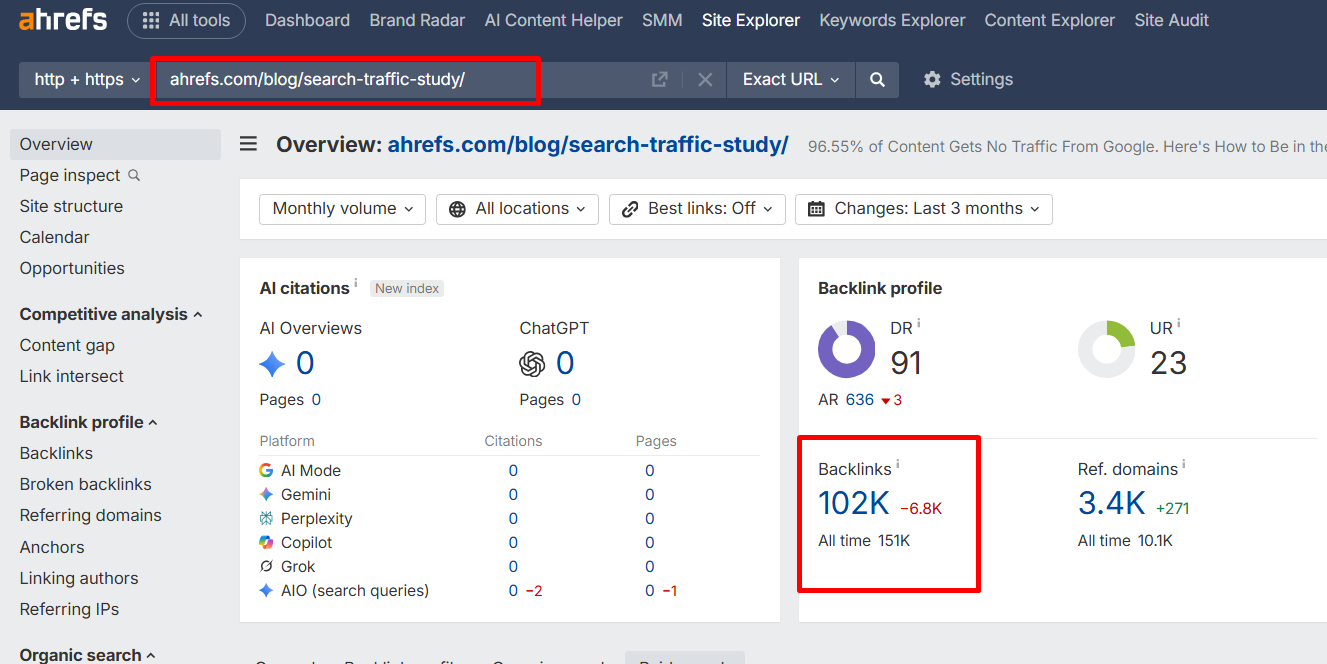
- Enter a competitor URL into Ahrefs Site Explorer or Semrush
- Open the backlinks report
- Filter the referring page URL column for “resources,” “links,” or “guide”
- Export the filtered list and check each page for topical fit with your content
This method consistently surfaces high-quality prospects that operator searches miss entirely. Pages linking to your competitor have already demonstrated they link to content like yours.
Ahrefs and Semrush Prospecting
Both tools extend your prospecting beyond what Google operators can surface:
- In Ahrefs Content Explorer, run an “in title” search for “best [topic]” and filter for DR 30+. This finds listicle resource pages curated “best of” lists that standard operators never return.
- In Semrush Backlink Analytics, enter a competing domain and filter referring pages by the word “resources.” You get a qualified list without running 20 separate Google searches and merging CSVs manually.
Educational and Government Sites
.edu and .gov resource pages carry significant link equity. A single placement on a university department’s resource list can outperform ten placements on average DR 40 sites.
Use these search strings to find them:
- site:.edu keyword intitle:resources
- site:.gov keyword “helpful links”
- site:.edu keyword “further reading”
These pages rarely respond to template outreach. A personalised email that references a specific section of their page and explains exactly how your resource fills a gap is the only approach that works here.

How to Vet Resource Pages
Vetting is the step that separates a 2% reply rate from a 15% reply rate. Raw prospecting lists have noise. Manual review without metric filtering wastes hours. The process below cuts both problems.
Filter by Metrics First
Run your full prospect list through Ahrefs Batch Analysis or Semrush’s bulk URL checker before opening a single page manually. This takes 10 minutes and removes 60–70% of the list before you spend time on it.
The SERP Forge Resource Page Vetting Tiers organise what remains:
| Tier | DR | Monthly Traffic | Action |
| Priority | 50+ | 10,000+ | Manual review immediately |
| Standard | 30–50 | 5,000–10,000 | Manual review in batch |
| Skip | Under 30 | Under 5,000 | Remove from list |
A 200-page raw prospect list typically becomes 50–60 pages after this filter. That is a manageable manual review.
Manually Review What Remains
Open remaining URLs in batches of five to ten. Use a tab-opening tool like openallurls.com to speed this up. For each page, ask four questions:
- Does the page link to external resources and not only its own internal content?
- Is your content a clear fit for one specific section of the page?
- Are the existing links mostly live?
- Is there a real, identifiable person managing the site?
Four yes answers means it goes to your outreach list. One no means remove it. Precision here is what protects your outreach reply rate and your time.
How to Do Resource Page Outreach?
Bad outreach is the reason most people think resource page link building does not work. The tactic is sound. The emails are not. A generic pitch sent to the wrong person on a barely-relevant page has a near-zero chance of success.
A personalised email to the right contact, referencing a specific section, with a broken link flag included.
Find the Right Contact
Never send your resource page outreach to info@ or contact@. Generic inboxes are where pitches go to be ignored. Find the person who actually manages the page:
- Check the site’s “About” or “Team” page for an editor or content manager
- Search LinkedIn for the site name alongside titles like “editor,” “content manager,” or “SEO lead”
- Use Hunter.io or Snov.io to find and verify the email format once you have a name
- If the site has a “suggest a resource” form, use it. Respecting the owner’s preferred contact method signals professionalism
Write an Outreach Email
The email that gets a yes does three things: it references the specific page, it names a specific section and it makes adding the link easy. Two templates ready to adapt:
Template 1: Standard Resource Page Pitch
Subject: Quick question about your [topic] resources
Hi [First Name],
I came across your [page title] while researching [topic]. One of the better curated lists I have found on this.
I noticed you have a section on [specific section]. I recently published a [guide/tool/study] on [topic]: [URL]
It covers [one specific angle existing links do not]. It might be a useful addition under [section name].
Either way, great page.
[Your Name]
Template 2: Broken Link Pitch
Subject: Broken link on your [topic] page
Hi [First Name],
I was browsing your [page title] and noticed a few links are no longer working:
- [Broken URL 1]
- [Broken URL 2]
Thought you would want to know.
I also have a resource that could fill the gap: [Your URL]. It covers [what it covers] and is actively maintained.
Happy to help either way.
[Your Name]
Point Out Broken Links
Flagging broken links before pitching is the single highest-converting move in resource page outreach. The site owner now has two reasons to open your email and one reason to edit the page. Adding your link becomes part of a task they were already going to do.
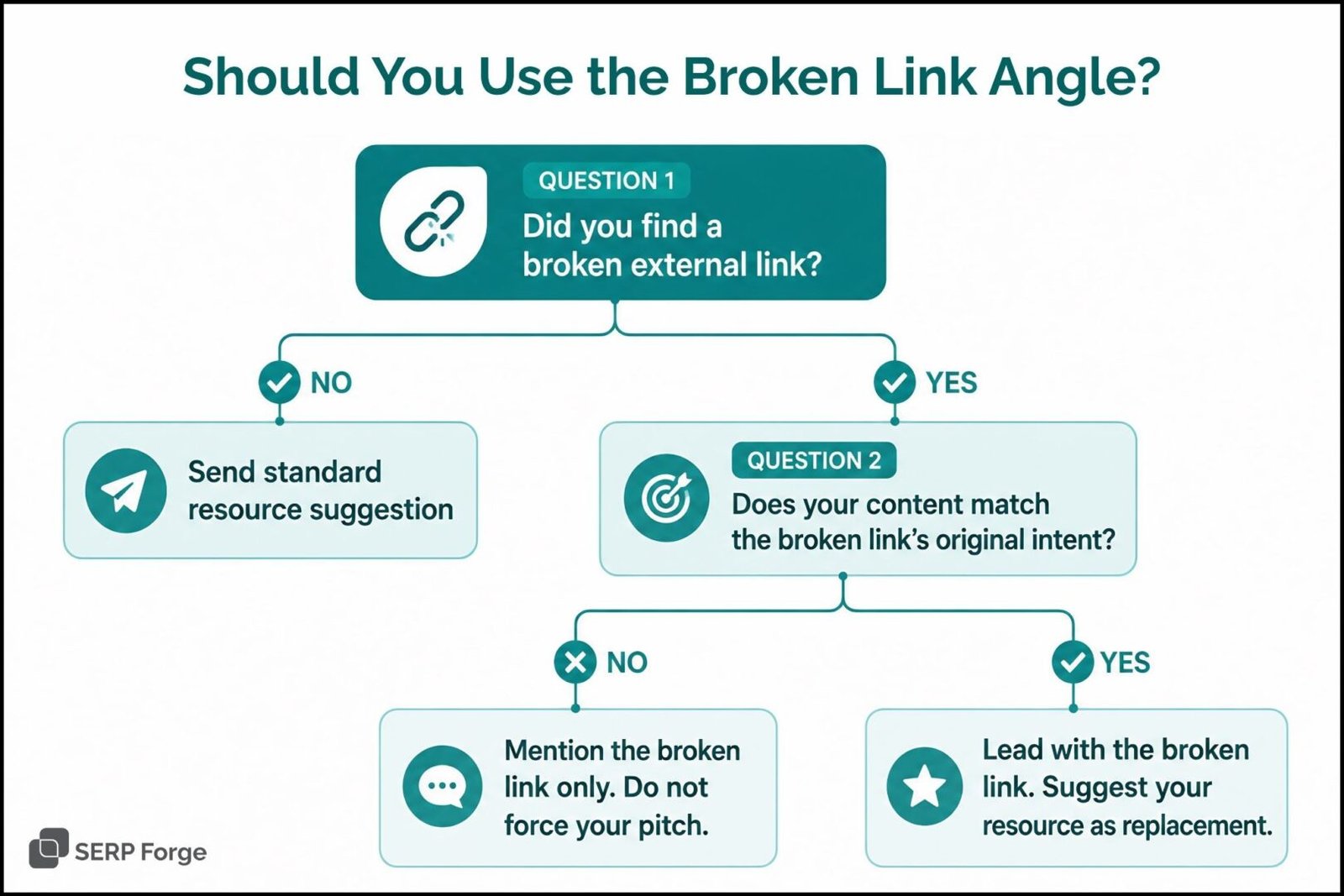
Use Ahrefs SEO Toolbar to check any resource page: go to Outgoing Links, click “Check status,” and filter for 4xx errors. Export the broken URLs and add them to your outreach email before sending.
If you use Screaming Frog, go to Bulk Export, then Response Codes, then External Client Error (4xx) Inlinks for a faster batch export.
Specify Where Your Link Should Go
Many resource pages are divided into subsections by subtopic. Do not make the owner decide where your link fits.
Tell them directly: “I thought it could sit under your [Tools] section” or “It looks like a natural fit alongside the [specific existing link] in the [section name] section.”
This removes one decision from their side and ensures your link gets placed in the most relevant spot on the page.
Follow Up Without Being Pushy
One follow-up email sent five to seven days after your first message is standard practice. Keep it short with maximum two lines:
Hi [Name], just following up on the resource suggestion from last week. Happy to answer any questions if useful.
Two contacts is professional outreach. Three becomes spam. Stop after one follow-up and move the prospect to a “re-contact in 60 days” list if the page is high priority.
How to Scale Resource Page Link Building
Once the core process works, scaling is about finding more pages faster. These three methods expand your prospect pipeline without starting from scratch each month.
Search Backlink Profiles of Already-Linked Pages
Resource pages tend to link to the same domains repeatedly. If one site in your niche has resource page backlinks, the pages linking to it will likely link to similar content. Here is how to find them:
- Crawl your vetted resource pages list with Screaming Frog
- Go to Bulk Export, then Links, then External Links
- Copy all destination URLs from the export
- Paste them into Ahrefs Site Explorer
- In the Backlinks report, filter referring page URLs for “resources” or “links”
You will surface dozens of new resource pages that no operator search would find. This method compounds; each new resource page you land gives you another set of backlink profiles to mine.
Target Listicle Resource Pages
“Best [thing]” listicles are resource pages that standard search operators completely miss. They curate and link to content exactly like traditional resource pages do. They just do not use the word “resources” in the URL or title.
Search Google for “best [topic]” and use Ahrefs Content Explorer to filter results by DR 30+. These pages receive fewer outreach pitches than traditional resource pages. A well-personalised email stands out here because the owner is less used to hearing from link builders.
Find Pages With Resource Sections
Many blog posts include a “further reading” or “other resources” section that links to external content. These embedded resource sections are underused link opportunities. Use these search strings to find them:
- keyword “further reading”
- keyword “other resources”
- keyword “favorite tools”
- keyword “learn more”
- keyword “recommended reading”
Check each result manually using CTRL+F to confirm the section links to external content. If it links only to internal pages, skip it. Conversion rate is lower than traditional resource pages, but a personalised email referencing the specific section still converts.
Does Resource Page Link Building Still Work in 2026?
Yes. It remains one of the most consistent white-hat link building strategies producing real results in 2026. Google’s spam updates have made low-quality link schemes significantly less viable. Paid links, PBNs and link exchanges face higher penalty risk than at any previous point. That makes resource page backlinks earned editorially, topically placed and never paid for, more valuable by comparison.
Well-vetted outreach lists with personalised emails convert at 10–20% per batch. The SEOs getting poor results are skipping vetting, using generic templates, or emailing the wrong contact. The process in this guide eliminates all three problems.
Resource Page Link Building Tools
The right tool stack covers three things: finding pages, checking quality and managing outreach. You do not need all of these.
Match the tools to your volume and budget:
| Tool | Best For | Cost |
| Ahrefs Site Explorer | Competitor backlink analysis, broken link detection | Paid |
| Ahrefs SEO Toolbar | On-page broken link checking, SERP CSV export | Free / Paid |
| Semrush Backlink Analytics | Referring domain filtering, anchor text data | Paid |
| Hunter.io | Finding and verifying contact emails | Freemium |
| Screaming Frog | Crawling resource pages for outgoing link data | Free up to 500 URLs |
| BuzzStream / Pitchbox | Outreach at scale with personalised mail merge | Paid |
| Check My Links (Chrome) | Fast broken link scan on any page | Free |
| Google Sheets + merge-csv.com | Merging operator search exports into one list | Free |
Resource Page Link Building Checklist
Run through this link-building checklist for the resource page before every outreach batch. It takes five minutes and prevents the mistakes that kill reply rates:
Prospecting:
- Used at least five Google search operator variations
- Pulled competitor resource page backlinks from Ahrefs or Semrush
- Searched for listicle pages (“best [topic]”) and pages with resource sections
- Mined backlink profiles of sites with known resource page links
Vetting:
- Filtered full list by DR 30+ and 5,000+ monthly traffic
- Sorted into SERP Forge Vetting Tiers (Priority / Standard / Skip)
- Manually reviewed each remaining page for topical fit
- Confirmed each page links to external resources
- Checked for broken links using Ahrefs Toolbar or Check My Links
Outreach:
- Found the name of the person responsible for the page
- Email references the specific page and a named section
- Broken links flagged in the email where found
- Specific link placement suggested
- One follow-up scheduled for five to seven days later
- Prospects with no reply moved to 60-day re-contact list
Get the Free Resource Page Prospecting Template for Free.
Download the free SERP Forge Resource Page Prospecting Template with the SERP Forge Vetting Tiers, broken link columns, outreach status tracking and follow-up scheduling built in.
Conclusion
You now have the full process. Find resource pages your competitors already have backlinks from. Vet them against the SERP Forge tiers. Check each page for broken links before you write a single word.
Then send one personalised email that names the section, flags the dead links and explains exactly why your resource belongs there.
That is one afternoon of work per batch. Run it every month. Each link you earn builds domain authority that makes the next batch easier.
Start with five competitor backlinks. Find the resource pages behind them. Send the email today.
FAQs
Is resource page link building safe for SEO?
Yes. It is a white-hat tactic that follows Google’s link quality guidelines fully.
How many resource page links do I need to see results?
It depends on your niche, the DR of pages you land and your backlink gap versus competitors. Ten relevant links from stronger pages are more likely to support rankings than fifty loosely related, low-traffic links. Expect measurable movement between months three and six.
Can I do resource page link building for a new website?
Yes, but build strong content before you start. Resource page owners review every page they consider linking to. Thin or incomplete content will not pass that review, no matter how good the outreach email is.
What is the difference between resource page link building and broken link building?
Resource page link building adds your content to active curated lists. Broken link building replaces dead links with your content instead.
The two work best together. Flagging broken links inside a resource page pitch gives the site owner two reasons to act in one email.
Should I hire an agency for resource page link building?
If your team can run 20–30 personalised pitches per week, do it in-house. If volume or bandwidth is a problem, hire a SaaS link building agency.
Ask to see their vetting criteria and a sample outreach email before signing anything.